

Internet Providers Available at Your Address
The fastest way to find out what internet service is available at your address is to enter your ZIP code into an internet availability checker, review the providers serving your area, and then verify service for your exact street address before ordering. Internet availability is not the same everywhere — even two houses on the same street can have different options. That’s because provider networks, local infrastructure, service boundaries, and building wiring all vary from one location to the next.
Entering your ZIP code is the quickest first step. It shows you which providers operate in your area so you can narrow your choices in seconds instead of calling companies one by one.

Find Internet Providers in Your Area
Enter your ZIP code to find internet providers and service options available in your area.
How to Find Internet Providers Available at Your Address
Finding the internet providers for your address takes just a few minutes when you follow a simple
process:
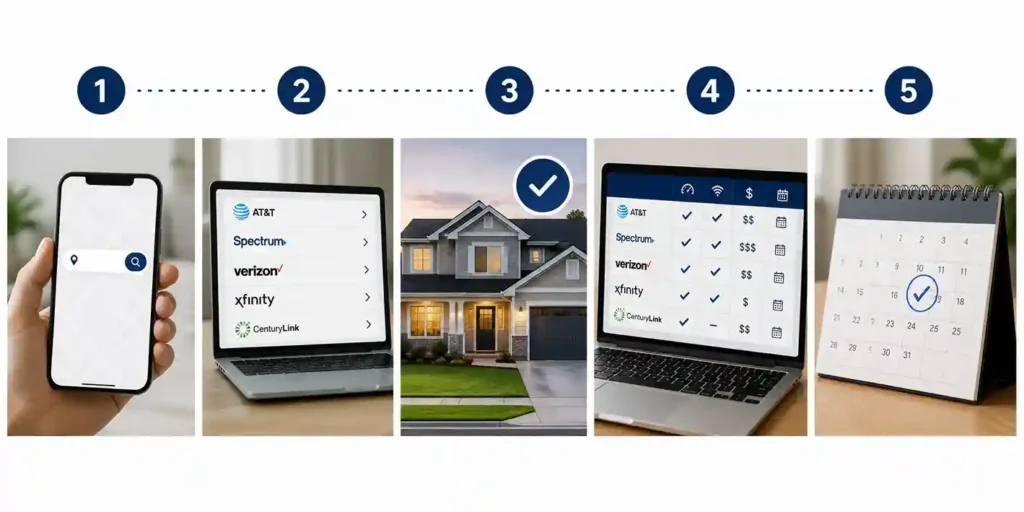
1. Enter your ZIP code in the availability checker above.
2. Review the internet providers currently serving that area.
3. Verify availability for your exact street address. ZIP-code results show which providers operate
nearby, but final serviceability depends on your specific address.
4. Compare your options — connection type, download and upload speeds, monthly price, contract
terms, and installation requirements.
5. Choose a provider and confirm service for your address before placing an order or scheduling
installation.
Think of the ZIP code search as a starting point. It tells you who serves your area. Address-level
verification tells you who can actually connect your home — and that final step is the one that prevents
surprises on installation day.
Why Internet Availability Varies by Address
If you’ve ever wondered why your neighbor has fiber while your home tops out at DSL, the answer
comes down to a handful of factors.
Provider Network Coverage
Every internet provider operates within a defined service area, or network footprint. National brands don't serve every state, and regional providers may only cover a handful of counties. A provider “available in your city” may still only reach certain neighborhoods within it.
Local Internet Infrastructure
The physical lines and equipment near your home determine what services you can get. Fiber-optic lines, coaxial cable networks, copper telephone lines, fixed wireless towers, and satellite coverage each support different types of internet service — and none of them are deployed uniformly. Your address can only receive the services that its surrounding infrastructure supports.
Urban vs. Rural Locations
Urban and suburban addresses often have multiple wired broadband options, sometimes including both cable and fiber. Rural addresses tend to rely more heavily on fixed wireless, DSL, or satellite internet, because building wired networks across long distances with fewer customers is more expensive for providers.

Apartments, Condos, and Multi-Dwelling Units
Apartment and condo buildings add another layer. Some buildings have exclusive agreements with a single provider, others come pre-wired with specific infrastructure, and older buildings may have limited wiring options that restrict which services can be installed in individual units. If you're renting, it's worth asking the property manager which providers already serve the building.
New Construction and Recently Developed Neighborhoods
Newly built homes and recently developed neighborhoods sometimes don't appear in provider databases right away. Even if lines run to the street, your address may need to be added to the provider's serviceability system before you can order — which is one more reason to check early if you're moving into new construction.
How to Set Up Internet at a New Address
Moving is one of the most common reasons people search for internet options. Whether you’re a renter
signing a new lease, a homeowner closing on a house, a student heading to a new city, or relocating for
work, setting up new address internet works best when you plan ahead:
1. Check internet availability before the move. Run your new ZIP code through the availability
checker as soon as you know your address.
2. Ask your current provider about transferring service. If they serve your new address, transferring
is often faster than starting fresh.
3. Compare other providers at the new address. A move is a natural time to switch — you may find
faster speeds or better pricing than your current plan.
4. Schedule installation early. Installation appointments can book out one to two weeks, especially at
the start of the month when most moves happen.
5. Confirm the details. Verify equipment, installation fees, contract terms, and your activation date
before move-in day.
6. Don’t cancel your existing service too early. When practical, keep your current connection active
until the new one is confirmed and working.
What Types of Internet Service May Be Available at Your Address?
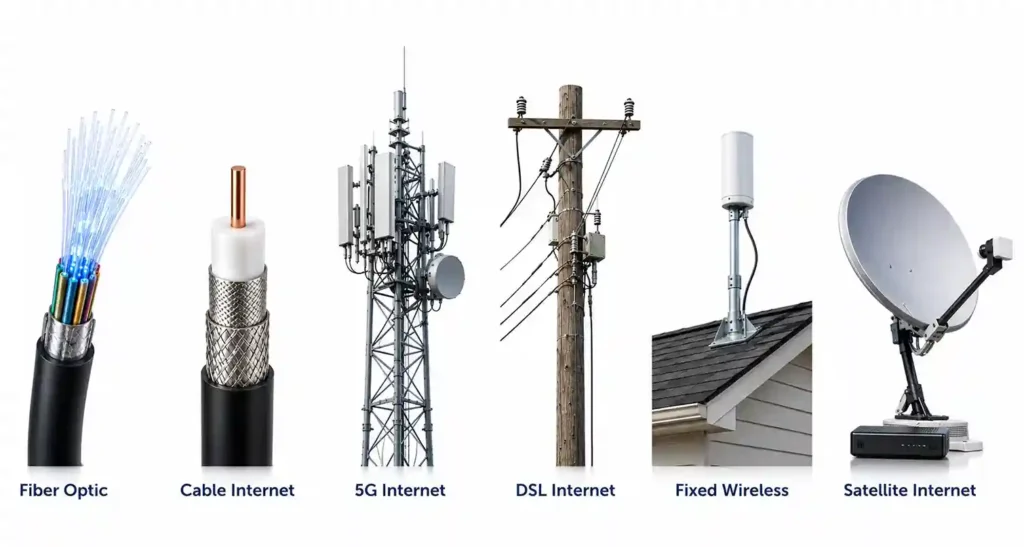
Depending on your location, you may see some or all of these connection types when you check
availability.
Fiber Internet
Fiber delivers the fastest and most reliable home internet available today, with symmetrical upload and download speeds where offered — meaning uploads can be just as fast as downloads. The tradeoff is availability: fiber networks are still expanding, and address-level coverage is more limited than cable, even within cities that have fiber service.
Cable Internet
Cable internet runs over the same coaxial networks that deliver cable TV, which makes it one of the most widely available wired options. Speeds are strong for most households, though because cable networks are shared among neighbors, performance can dip slightly during peak evening hours.
5G Home Internet
5G home internet delivers wireless broadband to a receiver in your home using nearby cellular towers. It's quick to set up and often contract-free, but it requires strong 5G coverage at your address, and performance can vary based on your location, signal strength, and local network capacity.
DSL Internet
DSL runs over existing copper telephone lines, which gives it broad reach in areas without newer infrastructure. Speeds vary significantly depending on your distance from the provider's equipment and the condition of the lines — the farther away you are, the slower the connection tends to be.
Fixed Wireless Internet
Fixed wireless beams internet from a local tower to an antenna on your home. It's most relevant in suburban and rural areas where wired broadband is limited, offering a middle ground between DSL and satellite in both speed and availability.
Satellite Internet
Satellite internet works almost anywhere with a clear view of the sky, which makes it the fallback option for remote and rural addresses. Modern low-Earth-orbit satellite services have improved speeds and latency considerably, though weather and network congestion can still affect performance.
| Internet Type | Typical Speed Range | Best For | Main Limitation | Availability |
|---|---|---|---|---|
| Fiber | 300 Mbps – 5 Gbps | Heavy streaming, gaming, remote work | Limited address-level coverage | Growing; mostly urban/suburban |
| Cable | 100 Mbps – 1 Gbps+ | Most households | Shared network slowdowns at peak times | Very wide in populated areas |
| 5G Home | 50 – 300+ Mbps | Renters, quick setup, no-contract users | Depends on signal and tower capacity | Expanding in covered areas |
| DSL | 10 – 100 Mbps | Basic browsing where options are limited | Speed drops with distance | Wide, but aging infrastructure |
| Fixed Wireless | 25 – 300 Mbps | Suburban and rural homes | Requires line of sight to a tower | Regional |
| Satellite | 25 – 220 Mbps | Rural and remote addresses | Weather and latency sensitivity | Nearly nationwide |
Speeds are typical ranges; actual plans and performance vary by provider and location.
How to Compare Internet Providers at Your Address
Once you know which providers serve your address, don’t choose based on the biggest advertised speed alone. The best plan for your home depends on the full picture:
- Actual address-level availability — confirm the plan you want is serviceable at your exact address, not just your ZIP code.
- Download and upload speeds — match speeds to how your household actually uses the internet.
- Introductory price vs. standard price — many promotional rates increase after 12 months; know what you'll pay later.
- Data caps — some plans limit monthly usage or charge overage fees.
- Contracts — check the term length and any early termination fees.
- Equipment fees — modem and router rental can add to the monthly bill; ask whether you can use your own.
- Installation fees — professional installation may carry a one-time cost, though promotions often waive it.
- Price increases — review how the provider handles annual rate changes.
- Customer service — support quality matters when something goes wrong.
- Reliability — wired connections (fiber, cable) are generally more consistent than wireless options.
- Promotions and bundles — TV, mobile, or streaming bundles can add value if you'd use them anyway.
Find Internet Providers in Your Area
Enter your ZIP code to find internet providers and service options available in your area.
Why a Provider May Serve Your ZIP Code but Not Your Exact Address
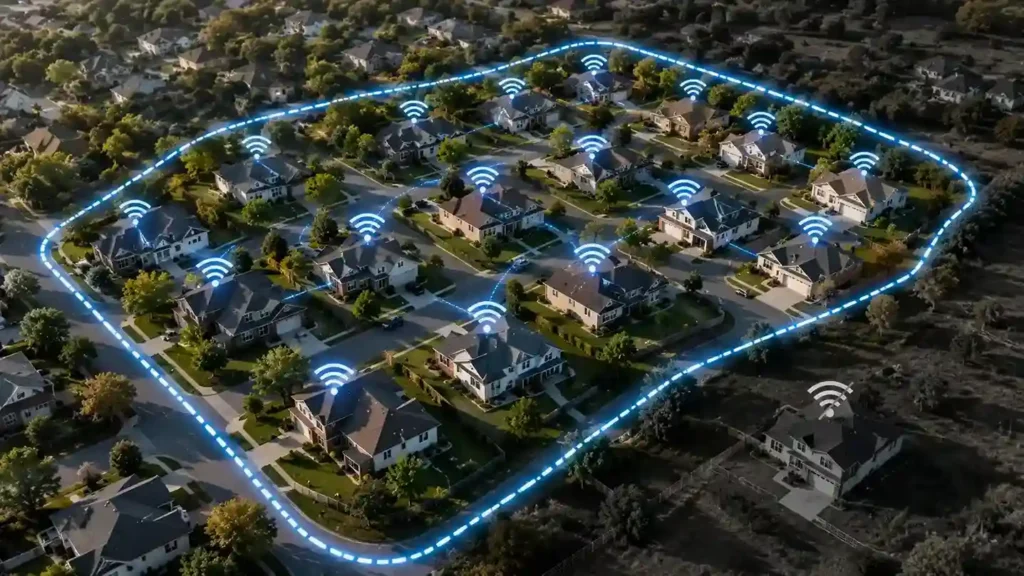
This is one of the most frustrating experiences in shopping for internet: a provider shows up in your ZIP
code results, but when you enter your street address, service isn’t available. Here’s why that happens:
- Network boundaries can run through the same ZIP code. A provider's coverage map doesn't follow postal lines — it follows where their equipment is built.
- One side of a street may have fiber while the other doesn't. Fiber deployment often happens block by block, so coverage gaps at the street level are common.
- Apartment buildings have their own infrastructure. Your building's wiring or provider agreements may differ from the houses around it.
- Newly constructed homes may not exist in provider databases yet. The service may physically reach your address before the provider's system recognizes it.
- Capacity or serviceability restrictions can prevent new installations in an area even where the network exists.
The takeaway: always complete final address verification before ordering service or canceling an existing
plan. ZIP-code results tell you what’s likely; address verification tells you what’s real.
What to Do If Your Address Has Limited Internet Options
If your address comes back with few or no wired broadband results, you still have practical paths
forward:
Check fixed wireless providers operating in your county or region.
Check 5G home internet availability — coverage is expanding quickly, and eligibility can change
from one quarter to the next.
Consider satellite internet, which reaches nearly any address with open sky.
Ask local providers about planned network expansion — some maintain waitlists and will notify you when your address becomes serviceable.
Check whether a nearby fiber or cable provider is expanding into your neighborhood; federal and state broadband funding is actively extending networks into underserved areas.
Compare mobile hotspot options for temporary connectivity while you wait for a permanent
solution.
Can You Get Internet Service Before Moving Into a New Home?
Yes — and you should. Most providers let you place an order and schedule installation for a future date, often two to four weeks in advance. The ideal time to check availability is as soon as you know your new address, even before you've signed the lease or closed on the home. Setting up new address internet before move-in day means your connection can be active the day you arrive — important if you work from home, have kids in school, or simply don't want to spend your first week without Wi-Fi. If the home has existing wiring from a previous resident's service, activation may not even require a technician visit.
How Accurate Are Internet Availability Checkers?
Availability checkers are a reliable way to identify which providers likely serve your area, and they'll save you hours compared to calling providers individually. That said, they have limits worth understanding: provider databases can lag behind real-world network changes, and some tools only confirm ZIP-codelevel coverage rather than exact-address serviceability. Treat any availability result as a strong starting point, then verify your exact street address with the provider before placing an order. That two-step approach gives you both speed and certainty.
Frequently Asked Questions
The internet service available at your address depends on the providers and infrastructure in your area.
The fastest way to find out is to enter your ZIP code in an availability checker, review the providers listed, and then verify service for your exact street address before ordering.
Start with a ZIP code search to see which providers serve your area, then confirm availability for your specific address with the provider. Comparing connection types, speeds, prices, and contract terms will help you choose the best option among the providers that can actually reach your home.
Yes. Online availability checkers let you see the providers serving your area by entering your ZIP code, with no phone call required. You’ll only need to contact a provider (or complete their online address check) to confirm exact-address serviceability and place an order.
Fiber networks are built block by block, so coverage can end mid-street. Your address may sit just outside the current network boundary, your building may lack fiber wiring, or local capacity limits may prevent new connections. Ask the fiber provider whether expansion to your address is planned.
Check availability at the new address as early as possible, compare the providers that serve it, and schedule installation before your move-in date. If your current provider serves the new address, transferring service is often the fastest option.
Yes. Provider network boundaries don’t follow street lines, so one side of a street can have fiber while the other relies on cable or DSL. This is exactly why exact-address verification matters more than ZIPcode results alone.
Look into 5G home internet, fixed wireless, and satellite internet — these wireless options cover many addresses that wired networks don’t reach. You can also ask local providers about expansion plans or join a waitlist for future service.
ZIP code checks are accurate for identifying which providers operate in your area, but they can’t guarantee service at your exact address. Always complete an address-level verification with the provider before ordering.
Ready to see your internet options?
Enter your ZIP code to find providers serving your area, compare available services, and verify internet availability for your address.